原创
本章我们将专注于 C 语言的 GUI 开发。 在前面的教程中,我们的程序大多像是一个“控制台战士”:你在小黑窗(终端)里输入一些数字或字符,程序在内存里经过复杂的计算,最后再把结果打印回小黑窗。
但现实世界中的软件,绝大多数都有漂亮的 图形用户界面 (GUI)。有窗口、有按钮、有菜单,用户可以通过鼠标点击来操作。是时候走出控制台了。
十多年前,我上学刚学C语言的时候,问老师如何绘制窗口和图像,老师很诚实,说她不会,因为她那些年也没有用C开发过有图形界面的项目。
虽然 C 语言本身并不包含图形库(标准库只管输入输出),但我们可以调用操作系统提供的 API,或者使用强大的第三方库来实现。
我们将通过实现同一个功能——完整的四则运算计算器,来分别展示 Windows 和 Linux 下不同的 GUI 开发方式。
第一部分:Windows 原生开发 (Win32 API)
如果你在 Windows 上开发,操作系统本身就提供了一套庞大的函数库,叫做 Windows API(也叫 Win32 API)。通过它,你可以控制 Windows 的一切。
1.1 设计思路
Windows 编程的核心是 消息循环 (Message Loop)。
为了实现一个完整的计算器,我们需要:
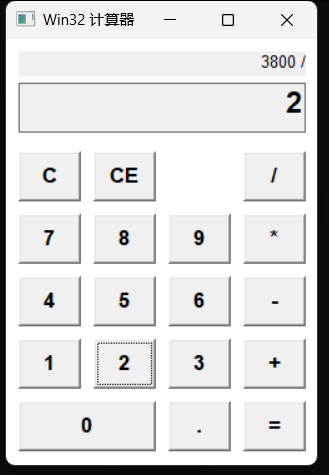
- 历史记录栏 (Static Control):显示当前的计算过程(如
12 + 5 *)。 - 主显示屏 (Edit Control):显示当前输入或结果。
- 完整键盘:包含 0-9, 小数点, 四则运算, 清除键(C/CE)。
- 逻辑处理:处理浮点数运算、防止除以零、防止多次输入小数点。
1.2 代码实现
文件:code_examples/gui/win32_calc.c
#include <windows.h>
#include <stdio.h>
#include <stdlib.h>
#include <string.h>

// 自动链接库 (仅限 MSVC/Clang-cl)
#pragma comment(lib, "user32.lib")
#pragma comment(lib, "gdi32.lib")

// 全局控件句柄
HWND hDisplay;
HWND hHistory;

// 状态变量
double stored_value = 0.0;
char last_operator = 0;
BOOL new_entry = TRUE; // 标记是否开始输入新数字
BOOL has_decimal = FALSE; // 标记当前数字是否已有小数点

// 按钮布局定义 (5行4列)
constchar *btn_labels[] = {
    "C", "CE", "", "/",  // 第一行: 清除全部, 清除当前, (空), 除
    "7", "8", "9", "*",  // 第二行
    "4", "5", "6", "-",  // 第三行
    "1", "2", "3", "+",  // 第四行
    "0", "", ".", "="    // 第五行: 0占两格(代码处理), 点, 等于
};

// 辅助函数:格式化双精度浮点数 (去除末尾多余0)
void format_double(char *buf, double val) {
    sprintf(buf, "%.10g", val);
}

// 辅助函数:执行计算
void calculate() {
    char buf[256];
    GetWindowText(hDisplay, buf, 256);
    double val = atof(buf);

    if (last_operator == '+') stored_value += val;
    elseif (last_operator == '-') stored_value -= val;
    elseif (last_operator == '*') stored_value *= val;
    elseif (last_operator == '/') {
        if (val != 0) stored_value /= val;
        else {
            MessageBox(NULL, "除数不能为零!", "错误", MB_OK | MB_ICONERROR);
            stored_value = 0;
        }
    } else {
        stored_value = val;
    }

    // 显示结果
    format_double(buf, stored_value);
    SetWindowText(hDisplay, buf);
}

// 更新历史显示 (例如 "123 + ")
void update_history(double val, char op) {
    char buf[256];
    char num_buf[64];
    format_double(num_buf, val);

    if (op != 0 && op != '=') {
        sprintf(buf, "%s %c", num_buf, op);
    } else {
        // 如果是等号或重置,清空历史
        buf[0] = '\0';
    }
    SetWindowText(hHistory, buf);
}

// 窗口过程函数
LRESULT CALLBACK WindowProc(HWND hwnd, UINT uMsg, WPARAM wParam, LPARAM lParam) {
    switch (uMsg) {
        case WM_CREATE: {
            // 字体
            HFONT hFontBtn = CreateFont(20, 0, 0, 0, FW_BOLD, FALSE, FALSE, FALSE, DEFAULT_CHARSET,
                                     OUT_DEFAULT_PRECIS, CLIP_DEFAULT_PRECIS, DEFAULT_QUALITY,
                                     DEFAULT_PITCH | FF_SWISS, "Arial");
            HFONT hFontDisplay = CreateFont(28, 0, 0, 0, FW_BOLD, FALSE, FALSE, FALSE, DEFAULT_CHARSET,
                                     OUT_DEFAULT_PRECIS, CLIP_DEFAULT_PRECIS, DEFAULT_QUALITY,
                                     DEFAULT_PITCH | FF_SWISS, "Arial");
            HFONT hFontHistory = CreateFont(16, 0, 0, 0, FW_NORMAL, FALSE, FALSE, FALSE, DEFAULT_CHARSET,
                                     OUT_DEFAULT_PRECIS, CLIP_DEFAULT_PRECIS, DEFAULT_QUALITY,
                                     DEFAULT_PITCH | FF_SWISS, "Arial");

            // 1. 历史记录 (Static Control, 右对齐)
            hHistory = CreateWindow("STATIC", "",
                WS_CHILD | WS_VISIBLE | SS_RIGHT,
                10, 10, 230, 20, hwnd, NULL, NULL, NULL);
            SendMessage(hHistory, WM_SETFONT, (WPARAM)hFontHistory, TRUE);

            // 2. 主显示屏 (Edit Control)
            hDisplay = CreateWindow("EDIT", "0",
                WS_CHILD | WS_VISIBLE | WS_BORDER | ES_RIGHT | ES_READONLY,
                10, 35, 230, 40, hwnd, NULL, NULL, NULL);
            SendMessage(hDisplay, WM_SETFONT, (WPARAM)hFontDisplay, TRUE);

            // 3. 创建按钮矩阵 (5行4列)
            int btn_w = 50;
            int btn_h = 40;
            int gap = 10;
            int start_y = 90;

            for (int i = 0; i < 20; i++) {
                if (strlen(btn_labels[i]) == 0 && i != 17) continue; // 跳过空标签,除了0旁边的空位(逻辑上0占两格)

                int row = i / 4;
                int col = i % 4;

                int x = 10 + col * (btn_w + gap);
                int y = start_y + row * (btn_h + gap);
                int w = btn_w;

                // 特殊处理 '0' 按钮,让它宽一点
                if (strcmp(btn_labels[i], "0") == 0) {
                    w = btn_w * 2 + gap; // 占两格
                } elseif (i == 17) {
                    continue; // 0的右边一格被占用了,跳过创建
                }

                HWND hBtn = CreateWindow("BUTTON", btn_labels[i],
                    WS_CHILD | WS_VISIBLE | BS_PUSHBUTTON,
                    x, y, w, btn_h,
                    hwnd, (HMENU)(100 + i), NULL, NULL);

                SendMessage(hBtn, WM_SETFONT, (WPARAM)hFontBtn, TRUE);
            }
            break;
        }

        case WM_COMMAND:
            if (LOWORD(wParam) >= 100 && LOWORD(wParam) < 120) {
                int btn_idx = LOWORD(wParam) - 100;
                constchar *label = btn_labels[btn_idx];
                char buf[256];

                // 数字处理
                if ((label[0] >= '0' && label[0] <= '9')) {
                    if (new_entry) {
                        SetWindowText(hDisplay, label);
                        new_entry = FALSE;
                        has_decimal = FALSE;
                    } else {
                        GetWindowText(hDisplay, buf, 256);
                        // 简单防止溢出
                        if (strlen(buf) < 16) {
                            // 如果是0且当前没有小数点,替换之
                            if (strcmp(buf, "0") == 0) SetWindowText(hDisplay, label);
                            else {
                                strcat(buf, label);
                                SetWindowText(hDisplay, buf);
                            }
                        }
                    }
                }
                // 小数点
                elseif (label[0] == '.') {
                    if (new_entry) {
                        SetWindowText(hDisplay, "0.");
                        new_entry = FALSE;
                        has_decimal = TRUE;
                    } elseif (!has_decimal) {
                        GetWindowText(hDisplay, buf, 256);
                        strcat(buf, ".");
                        SetWindowText(hDisplay, buf);
                        has_decimal = TRUE;
                    }
                }
                // 清除全部 (C)
                elseif (strcmp(label, "C") == 0) {
                    stored_value = 0.0;
                    last_operator = 0;
                    new_entry = TRUE;
                    has_decimal = FALSE;
                    SetWindowText(hDisplay, "0");
                    SetWindowText(hHistory, "");
                }
                // 清除当前 (CE)
                elseif (strcmp(label, "CE") == 0) {
                    SetWindowText(hDisplay, "0");
                    new_entry = TRUE;
                    has_decimal = FALSE;
                }
                // 等号处理
                elseif (label[0] == '=') {
                    calculate();
                    SetWindowText(hHistory, ""); // 清空历史
                    last_operator = 0;
                    new_entry = TRUE;
                }
                // 运算符处理 (+, -, *, /)
                elseif (strlen(label) > 0) { // 排除空按钮
                    char current_text[256];
                    GetWindowText(hDisplay, current_text, 256);
                    double current_val = atof(current_text);

                    if (last_operator != 0 && !new_entry) {
                        calculate();
                        // calculate 更新了 stored_value
                    } else {
                        stored_value = current_val;
                    }

                    last_operator = label[0];
                    update_history(stored_value, last_operator);
                    new_entry = TRUE;
                }
            }
            break;

        case WM_DESTROY:
            PostQuitMessage(0);
            return0;
    }
    return DefWindowProc(hwnd, uMsg, wParam, lParam);
}

int main() {
    WNDCLASS wc = {0};
    wc.lpfnWndProc = WindowProc;
    wc.hInstance = GetModuleHandle(NULL);
    wc.lpszClassName = "CalcWin32";
    wc.hbrBackground = (HBRUSH)(COLOR_WINDOW+1);
    wc.hCursor = LoadCursor(NULL, IDC_ARROW);
    RegisterClass(&wc);

    // 调整窗口大小
    CreateWindow("CalcWin32", "Win32 计算器",
        WS_OVERLAPPEDWINDOW | WS_VISIBLE & ~WS_MAXIMIZEBOX,
        100, 100, 265, 380, NULL, NULL, wc.hInstance, NULL);

    MSG msg;
    while (GetMessage(&msg, NULL, 0, 0)) {
        TranslateMessage(&msg);
        DispatchMessage(&msg);
    }
    return0;
}
1.3 编译与运行
使用 Clang 或 GCC 编译时,需要链接 user32 和 gdi32 库。另外,为了防止中文乱码警告,建议指定字符集。
clang win32_calc.c -o win32_calc.exe -luser32 -lgdi32 -finput-charset=UTF-8
-luser32 -lgdi32: 链接 Windows 系统库(虽然代码中加了#pragma,但显式指定更稳妥)。-finput-charset=UTF-8: 告诉编译器源码是 UTF-8 编码,解决中文乱码警告。
运行后,你会看到一个包含完整键盘的计算器窗口。因为 Win32 没有布局管理器,我们必须在代码中手动计算每个按钮的 x, y 坐标 (例如 10 + col * 60)。
第二部分:Linux (Ubuntu) 下的 GTK 开发
原生 Windows API 虽然强大,但代码无法在 Linux 上运行。如果你想开发跨平台的 GUI 应用,或者专注于 Linux 桌面开发,GTK (GIMP Toolkit) 是标准选择之一。
2.1 安装开发环境 (Ubuntu)
在 Ubuntu 下,安装 GTK 开发库非常简单:
sudo apt update
sudo apt install libgtk-3-dev -y
2.2 设计思路
GTK 使用 布局管理器 来排列控件,这比 Win32 的绝对坐标要灵活得多。
我们将使用:
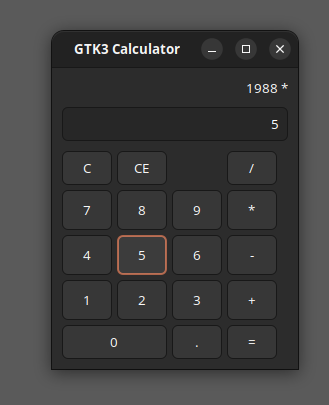
GtkGrid: 网格布局,非常适合计算器键盘。GtkEntry: 主显示屏。GtkLabel: 历史记录显示。GtkButton: 按钮。
2.3 代码实现
文件:code_examples/gui/gtk_calc.c
#include <gtk/gtk.h>
#include <stdlib.h>
#include <string.h>

// 全局控件指针
GtkWidget *entry_display;
GtkWidget *label_history;

// 状态变量
double stored_value = 0.0;
char last_operator = 0;
gboolean new_entry = TRUE;
gboolean has_decimal = FALSE;

// 辅助函数:格式化显示
void format_double(char *buf, double val) {
    sprintf(buf, "%.10g", val);
}

// 更新历史显示
void update_history(double val, char op) {
    char buf[256];
    char num_buf[64];
    format_double(num_buf, val);

    if (op != 0 && op != '=') {
        sprintf(buf, "%s %c", num_buf, op);
    } else {
        buf[0] = '\0';
    }
    gtk_label_set_text(GTK_LABEL(label_history), buf);
}

// 执行计算
void calculate() {
    constchar *text = gtk_entry_get_text(GTK_ENTRY(entry_display));
    double val = atof(text);

    if (last_operator == '+') stored_value += val;
    elseif (last_operator == '-') stored_value -= val;
    elseif (last_operator == '*') stored_value *= val;
    elseif (last_operator == '/') {
        if (val != 0) stored_value /= val;
        else {
            gtk_entry_set_text(GTK_ENTRY(entry_display), "Error");
            new_entry = TRUE;
            return;
        }
    } else {
        stored_value = val;
    }

    char buf[64];
    format_double(buf, stored_value);
    gtk_entry_set_text(GTK_ENTRY(entry_display), buf);
}

// 按钮点击回调
static void on_button_clicked(GtkWidget *widget, gpointer data) {
    constchar *label = gtk_button_get_label(GTK_BUTTON(widget));

    // 跳过空按钮
    if (strlen(label) == 0) return;

    // 数字键
    if (label[0] >= '0' && label[0] <= '9') {
        if (new_entry) {
            gtk_entry_set_text(GTK_ENTRY(entry_display), label);
            new_entry = FALSE;
            has_decimal = FALSE;
        } else {
            constchar *current_text = gtk_entry_get_text(GTK_ENTRY(entry_display));
            if (strlen(current_text) < 16) {
                if (strcmp(current_text, "0") == 0) {
                    gtk_entry_set_text(GTK_ENTRY(entry_display), label);
                } else {
                    char *new_text = g_strdup_printf("%s%s", current_text, label);
                    gtk_entry_set_text(GTK_ENTRY(entry_display), new_text);
                    g_free(new_text);
                }
            }
        }
    }
    // 小数点
    elseif (strcmp(label, ".") == 0) {
        if (new_entry) {
            gtk_entry_set_text(GTK_ENTRY(entry_display), "0.");
            new_entry = FALSE;
            has_decimal = TRUE;
        } elseif (!has_decimal) {
            constchar *current_text = gtk_entry_get_text(GTK_ENTRY(entry_display));
            char *new_text = g_strdup_printf("%s.", current_text);
            gtk_entry_set_text(GTK_ENTRY(entry_display), new_text);
            g_free(new_text);
            has_decimal = TRUE;
        }
    }
    // 清除全部 (C)
    elseif (strcmp(label, "C") == 0) {
        stored_value = 0.0;
        last_operator = 0;
        new_entry = TRUE;
        has_decimal = FALSE;
        gtk_entry_set_text(GTK_ENTRY(entry_display), "0");
        gtk_label_set_text(GTK_LABEL(label_history), "");
    }
    // 清除当前 (CE)
    elseif (strcmp(label, "CE") == 0) {
        gtk_entry_set_text(GTK_ENTRY(entry_display), "0");
        new_entry = TRUE;
        has_decimal = FALSE;
    }
    // 等号
    elseif (strcmp(label, "=") == 0) {
        calculate();
        gtk_label_set_text(GTK_LABEL(label_history), "");
        last_operator = 0;
        new_entry = TRUE;
    }
    // 运算符
    else {
        constchar *text = gtk_entry_get_text(GTK_ENTRY(entry_display));
        double current_val = atof(text);

        if (last_operator != 0 && !new_entry) {
            calculate();
        } else {
            stored_value = current_val;
        }

        last_operator = label[0];
        update_history(stored_value, last_operator);
        new_entry = TRUE;
    }
}

int main(int argc, char *argv[]) {
    gtk_init(&argc, &argv);

    // 1. 创建主窗口
    GtkWidget *window = gtk_window_new(GTK_WINDOW_TOPLEVEL);
    gtk_window_set_title(GTK_WINDOW(window), "GTK3 Calculator");
    gtk_container_set_border_width(GTK_CONTAINER(window), 10);
    g_signal_connect(window, "destroy", G_CALLBACK(gtk_main_quit), NULL);

    // 2. 垂直布局 (History + Display + Grid)
    GtkWidget *vbox = gtk_box_new(GTK_ORIENTATION_VERTICAL, 5);
    gtk_container_add(GTK_CONTAINER(window), vbox);

    // 3. 历史记录 (Label)
    label_history = gtk_label_new("");
    gtk_label_set_xalign(GTK_LABEL(label_history), 1.0); // 右对齐
    gtk_box_pack_start(GTK_BOX(vbox), label_history, FALSE, FALSE, 0);

    // 4. 显示屏 (Entry)
    entry_display = gtk_entry_new();
    gtk_entry_set_alignment(GTK_ENTRY(entry_display), 1.0); // 右对齐
    gtk_entry_set_text(GTK_ENTRY(entry_display), "0");
    gtk_editable_set_editable(GTK_EDITABLE(entry_display), FALSE); // 只读
    gtk_box_pack_start(GTK_BOX(vbox), entry_display, FALSE, FALSE, 5);

    // 5. 按钮网格
    GtkWidget *grid = gtk_grid_new();
    gtk_grid_set_row_spacing(GTK_GRID(grid), 5);
    gtk_grid_set_column_spacing(GTK_GRID(grid), 5);
    gtk_box_pack_start(GTK_BOX(vbox), grid, TRUE, TRUE, 0);

    constchar *labels[] = {
        "C", "CE", "", "/",
        "7", "8", "9", "*",
        "4", "5", "6", "-",
        "1", "2", "3", "+",
        "0", ".", "="
    };

    // 手动布局
    // Row 0
    GtkWidget *btn_c = gtk_button_new_with_label("C");
    g_signal_connect(btn_c, "clicked", G_CALLBACK(on_button_clicked), NULL);
    gtk_grid_attach(GTK_GRID(grid), btn_c, 0, 0, 1, 1);

    GtkWidget *btn_ce = gtk_button_new_with_label("CE");
    g_signal_connect(btn_ce, "clicked", G_CALLBACK(on_button_clicked), NULL);
    gtk_grid_attach(GTK_GRID(grid), btn_ce, 1, 0, 1, 1);

    // 空格占位 (2,0)

    GtkWidget *btn_div = gtk_button_new_with_label("/");
    g_signal_connect(btn_div, "clicked", G_CALLBACK(on_button_clicked), NULL);
    gtk_grid_attach(GTK_GRID(grid), btn_div, 3, 0, 1, 1);

    // Row 1-3 (Numbers)
    int num_idx = 4; // Start index in labels array
    for (int row = 1; row <= 3; row++) {
        for (int col = 0; col < 4; col++) {
            GtkWidget *btn = gtk_button_new_with_label(labels[num_idx++]);
            g_signal_connect(btn, "clicked", G_CALLBACK(on_button_clicked), NULL);
            gtk_widget_set_size_request(btn, 50, 40);
            gtk_grid_attach(GTK_GRID(grid), btn, col, row, 1, 1);
        }
    }

    // Row 4 (0, ., =)
    GtkWidget *btn_0 = gtk_button_new_with_label("0");
    g_signal_connect(btn_0, "clicked", G_CALLBACK(on_button_clicked), NULL);
    gtk_grid_attach(GTK_GRID(grid), btn_0, 0, 4, 2, 1); // 跨两列

    GtkWidget *btn_dot = gtk_button_new_with_label(".");
    g_signal_connect(btn_dot, "clicked", G_CALLBACK(on_button_clicked), NULL);
    gtk_grid_attach(GTK_GRID(grid), btn_dot, 2, 4, 1, 1);

    GtkWidget *btn_eq = gtk_button_new_with_label("=");
    g_signal_connect(btn_eq, "clicked", G_CALLBACK(on_button_clicked), NULL);
    gtk_grid_attach(GTK_GRID(grid), btn_eq, 3, 4, 1, 1);

    gtk_widget_show_all(window);
    gtk_main();

    return0;
}
2.4 编译与运行
使用 pkg-config 工具来自动生成编译参数。
# 注意:pkg-config 命令被反引号 ` 包围
gcc gtk_calc.c -o gtk_calc `pkg-config --cflags --libs gtk+-3.0`
运行 ./gtk_calc,你会看到一个风格现代、会自动调整布局的窗口。与 Win32 不同,这里的 gtk_grid_attach 自动处理了行列对齐,无需计算像素。
总结
| 特性 | Windows API (Win32) | GTK+ (Linux) |
|---|---|---|
| 坐标系统 | 绝对坐标 (像素),需手动计算位置 | 布局管理 (Box/Grid),自动适应窗口大小 |
| 代码风格 | 过程式,Switch-Case 消息循环 | 面向对象风格,信号与槽 (Signal/Callback) |
| 跨平台 | 仅 Windows | 跨平台 (Linux, Windows, macOS) |
| 主要用途 | 底层系统工具,极致性能需求 | 桌面应用,跨平台工具 |
对于初学者,GTK 的逻辑通常更容易理解,而 Win32 API 则是理解 Windows 操作系统底层运作的途径。
预览时标签不可点