前情提要:
MoXing:低预算场景用RX580显卡轻松运行Qwen3.5-9b-q4_k_m模型
Void + MoXing:低成本方案用RX580显卡本地运行qwen3.5:9B模型,打造类Cursor体验
MoXing新升级:直接夺舍 Ollama ,部分模型提速 50%
MoXing 和 Ollama 对比:从omnicoder-9b到更多模型
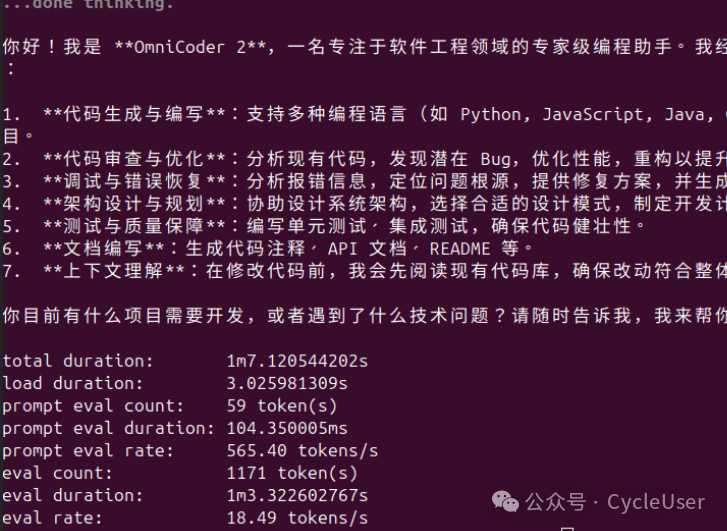
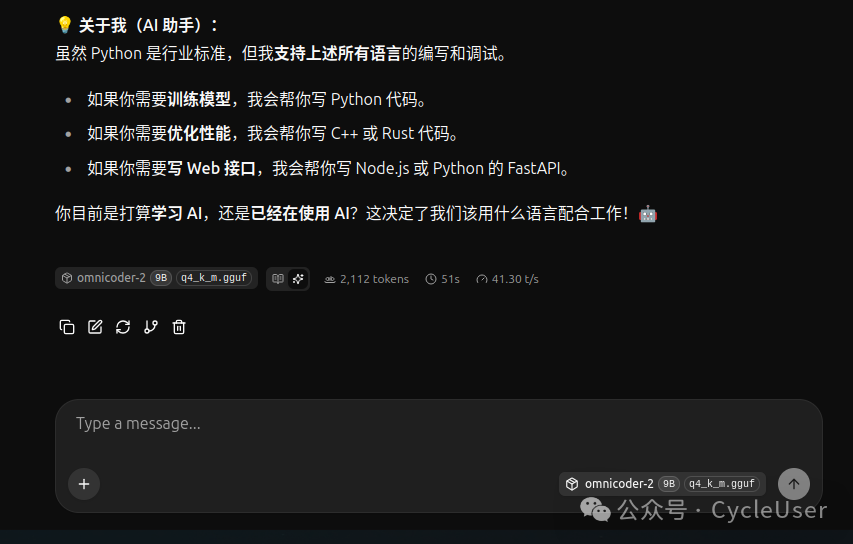
最近陆续改进,又拿 OmniCoder-2-9B 的 Q4_K_M 量化模型做了一组对比。同一个 gguf 文件,同一张 RTX 4060 8GB 显卡,分别用 MoXing 和 Ollama 来跑,再次看速度差多少。
安装
# 更新到最新版
pip install moxing -U
# 下载运行用的二进制文件
moxing download-binaries
$ moxing --help

 Usage: moxing [OPTIONS] COMMAND [ARGS]...

 Python wrapper for llama.cpp server

╭─ Options ──────────────────────────────────────────────────────────────────────────────────────────────────────────────────╮
│ --version  -V        Show version and exit                                                                                 │
│ --help               Show this message and exit.                                                                           │
╰────────────────────────────────────────────────────────────────────────────────────────────────────────────────────────────╯
╭─ Commands ─────────────────────────────────────────────────────────────────────────────────────────────────────────────────╮
│ version-cmd        Show version information.                                                                               │
│ serve              Start the LLM server with automatic configuration.                                                      │
│ run                Run inference with a model (auto-downloads if needed).                                                  │
│ chat               Interactive chat with a model.                                                                          │
│ download           Download a model from ModelScope (default) or HuggingFace.                                              │
│ models             List available models.                                                                                  │
│ devices            List available GPU devices and their capabilities.                                                      │
│ tune               Run warmup benchmark to find optimal parameters for a model.                                            │
│ cache              Analyze KV cache memory usage and compression options.                                                  │
│ config             Show optimal configuration for a model.                                                                 │
│ build              Build llama.cpp binaries from source.                                                                   │
│ download-binaries  Download pre-built llama.cpp binaries.                                                                  │
│ update-binaries    Update llama.cpp binaries to the latest version.                                                        │
│ clear-cache        Clear model and/or binary cache.                                                                        │
│ diagnose           Diagnose system and show installation recommendations.                                                  │
│ bench              Benchmark model performance (tokens/second, memory usage).                                              │
│ speed              Quick speed test with detailed output similar to ollama.                                                │
│ info               Show detailed model information and estimated performance.                                              │
│ check              Check GGUF model compatibility with llama.cpp.                                                          │
│ extract-mmproj     Extract multimodal projector from Ollama model.                                                         │
│ ollama             Manage Ollama models                                                                                    │
│ compress           GGUF compression commands                                                                               │
│ turboquant         TurboQuant KV cache compression commands                                                                │
│ monitor            Real-time monitoring commands                                                                           │
╰────────────────────────────────────────────────────────────────────────────────────────────────────────────────────────────╯

$ moxing devices
                                      Available Devices
┏━━━━━━━━┳━━━━━━━━━━━━━━━━━━━━━━━━━━━━━━━━━━┳━━━━━━━━━━┳━━━━━━━━━━━━┳━━━━━━━━━━━━┳━━━━━━━━━━┓
┃ ID     ┃ Name                             ┃ Backend  ┃ Memory     ┃ Free       ┃ Vendor   ┃
┡━━━━━━━━╇━━━━━━━━━━━━━━━━━━━━━━━━━━━━━━━━━━╇━━━━━━━━━━╇━━━━━━━━━━━━╇━━━━━━━━━━━━╇━━━━━━━━━━┩
│ gpu0   │ NVIDIA GeForce RTX 4060 Laptop G │ CUDA     │ 7.6GB      │ 7.5GB      │ nvidia   │
│ gpu1   │ AMD Radeon 610M (RADV RAPHAEL_ME │ VULKAN   │ -          │ -          │ amd      │
│ cpu    │ CPU                              │ CPU      │ -          │ -          │ cpu      │
└────────┴──────────────────────────────────┴──────────┴────────────┴────────────┴──────────┘

Backend Support:
  NVIDIA: CUDA, Vulkan
  AMD: ROCm, Vulkan

Usage:
  moxing ollama serve model -d gpu0 -b cuda
  moxing ollama serve model -d gpu1 -b rocm
  moxing ollama serve model -d gpu0 -b vulkan

CPU Offload Options:
  moxing ollama serve model --cpu-offload 10
  moxing ollama serve model --prompt-offload
先看数据
结果很简单,MoXing 快了一大截。
四个 prompt,同样的温度参数,同样的 128 token 输出限制:
写代码、做推理、写对联、解释 TCP/UDP。MoXing 稳稳跑到 41 tok/s 左右,波动很小,四个 prompt 都在 41.3 到 41.6 之间。平均 41.4 tok/s。
Ollama 呢?最快的 prompt 跑到 17.6 tok/s,最慢的只有 13.8。平均 16.6 tok/s。
MoXing 比 Ollama 快了差不多 2.5 倍。这不是什么误差范围的事,是实打实的两倍多。
| Prompt | MoXing | Ollama | 差距 |
|---|---|---|---|
| 写代码 | 41.6 tok/s | 13.8 tok/s | MoXing 快 201% |
| 推理题 | 41.3 tok/s | 17.5 tok/s | MoXing 快 136% |
| 写对联 | 38.7 tok/s | 13.5 tok/s | MoXing 快 187% |
| TCP/UDP | 41.4 tok/s | 17.6 tok/s | MoXing 快 135% |
有意思的是 Ollama 在写代码这个 prompt 上明显比其他三个慢,只有 13.8。写对联那个,MoXing 生成到对联写完就停了,31 个 token,只花了 0.8 秒——上联"智海扬帆通万象",下联"灵枢运算破千层",横批"智启未来"。Ollama 同一个 prompt 花了 9.5 秒生成了 128 个 token,多了一大堆额外的内容。
为啥 MoXing 更快
这不是玄学,就是三点。
第一,二进制版本。MoXing 用的是从 llama.cpp upstream 最新代码自己编译的二进制,commit d05fe1d7d,支持最新的 GPU kernel 优化、flash attention 3、fused Gated Delta Net 等等。Ollama 自带的 llama.cpp 版本很久没更新了,这些新优化都没跟上。这差距就跟用去年的显卡驱动打今年的游戏一样,少的东西太多了。
第二,参数控制。MoXing 可以直接指定 GPU 层数、KV cache 量化、batch size、ubatch size,你想怎么调就怎么调。Ollama 把大部分参数都藏起来了,你只能设个温度、上下文长度这些最表层的东西。参数给不给调,直接决定了性能的上限。
第三,没有中间层。MoXing 直接起一个 llama-server 进程,Python 这边只负责管理和监控。Ollama 的 runner 层在每次推理前有多道额外处理——tokenizer 的包装、请求调度、内存管理的抽象层——这些东西方便,但每一层都在吃性能。
新的 GPU 层数指定
以前 MoXing 只能让设备检测器自动决定多少层放 GPU 上。模型小就全放,模型大就自动 offload。你想自己手动调?不行。
现在加了个 --ngl 选项,直接控制 GPU 层数:
# 全部放 GPU
moxing serve model.gguf -b cuda --ngl 999

# 指定 76 层在 GPU
moxing serve model.gguf -b cuda --ngl 76

# 纯 CPU 跑
moxing serve model.gguf -b cpu --ngl 0
这个跟 --cpu-offload 不一样。--cpu-offload 10 是把 10 层放 CPU、其余放 GPU,是个反着来的思路。--ngl 更直接,你说多少层在 GPU 就是多少层。
你还可以组合着用。比如 9B 模型 8GB 显存跑着有点紧,可以试 --ngl 60 放 60 层在 GPU、剩下 16 层自动 offload 到 CPU。显存不够的时候这样能救命。
当然,llama.cpp 底层不支持指定某几层放 GPU、某几层放 CPU——它只能顺序来,前 N 层 GPU,后面的 CPU。这个 MoXing 也没办法,底层 binary 的能力限制。
KV Cache 量化策略对比
同一个 Q4_K_M 模型,同一句 prompt(写关于人工智能的七言对联),换不同的 KV cache 量化策略,速度和显存占用差别如下:
| KV Cache | tok/s | KV 显存 | 备注 |
|---|---|---|---|
| f16 | 40.7 | 128 MB | 默认,最高精度 |
| q8_0 | 38.8 | 68 MB | 8-bit 量化,省一半 |
| q4_0 | 41.0 | 36 MB | 4-bit 量化,省 72% |
| tq4 | - | - | 这款 SSM 模型不支持 |
TurboQuant 的 tq4 在这个模型上跑不了——qwen35 的 SSM 层跟 Flash Attention 的量化 V cache 不兼容。所以 tq3.5、tq3 这些更高压缩比的策略也都没法用。不是 MoXing 的问题,是 llama.cpp 底层对 SSM 架构的支持还在完善中。
不过 q4_0 的表现有点意思。它不但是最省显存的(KV cache 只占 36MB,f16 占了 128MB),速度还略微比 f16 快一点(41.0 vs 40.7)。原因是 KV cache 的数据量小了,每次 attention 计算时从显存搬的数据少,内存带宽的瓶颈松了一点。
q8_0 反而最慢,38.8 tok/s。因为 8-bit 量化需要额外的反量化运算,这个开销抵消了数据量减少带来的好处。到了 4-bit,数据量减少的收益才超过反量化的开销。
总结一下:日常用默认的 f16 就行,稳。显存紧张的时候开 q4_0,速度不降反升,KV cache 省 72%。长上下文场景这个差距会更大——32K 上下文下 f16 的 KV cache 要吃掉差不多 1GB,q4_0 只要 288MB。
之前设上下文只有 -c 一个选项。现在 --ngl、--cpu-offload 和 --kv-cache 可以组合使用,精确控制多少层在 GPU、多少显存留给 KV cache。
比如你要跑 32K 上下文。模型占 5.3GB,f16 KV cache 要吃掉约 1GB,8GB 显存刚好卡线。换成 q4_0 cache,KV 只占 280MB,立刻宽松了。再极端点,q4_0 + offload 10 层到 CPU,显存能留出快 4GB 空闲:
# 默认:f16 cache,全 GPU
moxing serve model.gguf -b cuda -c 32768

# 省显存:q4_0 cache,全 GPU
moxing serve model.gguf -b cuda -c 32768 --kv-cache q4_0

# 极限:q4_0 + CPU offload,最省显存
moxing serve model.gguf -b cuda -c 32768 --kv-cache q4_0 --cpu-offload 10
以前这些参数都是隐式的,你不知道到底几层在 GPU 上、KV cache 吃多少显存。现在你可以精确控制,知道自己在干什么。
运行方式
# 极速(全 GPU,默认参数)
moxing serve omnicoder-2-9b-q4_k_m.gguf -b cuda

# 长上下文(40 层 GPU,腾显存给 32K 上下文)
moxing serve omnicoder-2-9b-q4_k_m.gguf -b cuda --ngl 40 -c 32768

# 纯 CPU 跑模型
moxing serve omnicoder-2-9b-q4_k_m.gguf -b cpu --ngl 0 -c 1024
测试数据来自 MoXing 0.1.29,Ollama 0.22.1,RTX 4060 8GB。
预览时标签不可点
Close
更多
Name cleared
微信扫一扫赞赏作者
Like the AuthorOther Amount
赞赏后展示我的头像
作品
暂无作品
Like the Author
Other Amount
¥
最低赞赏 ¥0
OK
Back
Other Amount
更多
赞赏金额
¥
最低赞赏 ¥0
1
2
3
4
5
6
7
8
9
0
.
大语言模型 · 目录
大语言模型
上一篇先教会再让它做——大模型定制化里CPT和SFT到底在干什么下一篇MoXing 助力垃圾佬用百元超廉价显卡本地运行omnicoder-2-9b模型结果也只有十几个tokens/s
Close
更多
搜索「」网络结果
Close
调整当前正文文字大小
更多
100%