NixOS的默认镜像安装容易因为网络等多方面原因在46%处卡死,使用TUNA镜像加速安装解决。
具体方法是先要使用iso镜像启动,选择 KDE Plasma,启动之后先不要马上安装,而是打开终端,修改 /etc/nix/nix.conf 中 substituters 为 tuna 镜像源。
LiveOS 启动之后,/etc/nix/nix.conf 这个文件无法写入,需要先复制一份,修改,然后删除源文件,再替换过去。
终端中输入:
sudo cp /etc/nix/nix.conf /etc/nix/nix.conf.back # 复制一份sudo rm /etc/nix/nix.conf # 删除源文件sudo nano /etc/nix/nix.conf.back # 修改
在打开的文件中将
substituters =https://cache.nixos.org[1]
替换为
substituters = https://mirrors.tuna.tsinghua.edu.cn/nix-channels/store[2]
然后
sudo cp /etc/nix/nix.conf.back /etc/nix/nix.conf
如下图所示: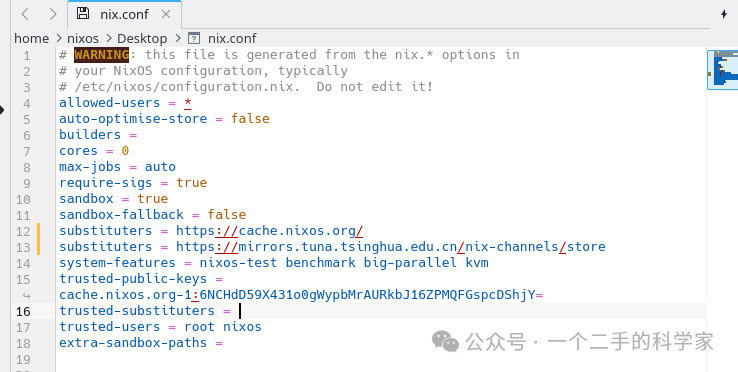 也可以使用下面的脚本:
#!/bin/bash#!/bin/bashsudo cp /etc/nix/nix.conf /etc/nix/nix.conf.back && \sudo rm /etc/nix/nix.conf && \sudo sed -i 's|https://cache.nixos.org|https://mirrors.tuna.tsinghua.edu.cn/nix-channels/store|g' /etc/nix/nix.conf.back && \sudo cp /etc/nix/nix.conf.back /etc/nix/nix.confecho "Nix mirror configuration updated."
完成了上面的修改之后,再继续运行安装器,就不会卡在46%了。
References
[1]: https://cache.nixos.org
[2]: https://mirrors.tuna.tsinghua.edu.cn/nix-channels/store
预览时标签不可点
Close
更多
Name cleared
微信扫一扫赞赏作者
Like the AuthorOther Amount
赞赏后展示我的头像
作品
暂无作品
Like the Author
Other Amount
¥
最低赞赏 ¥0
OK
Back
Other Amount
更多
赞赏金额
¥
最低赞赏 ¥0
1
2
3
4
5
6
7
8
9
0
.
虚拟化,操作系统,以及一些小工具 · 目录
虚拟化,操作系统,以及一些小工具
上一篇Ubuntu 24.04 系统上通过KVM虚拟机安装和运行 MacOS Tahoe 26.1下一篇VMware虚拟机运行macOS:unlcok+recoveryos+OC4VM 实现,提供百度云盘下载
Close
更多
搜索「」网络结果
Close
调整当前正文文字大小
更多
100%